 Cevix
CevixYour number,
anywhere on Wi-Fi.
Put your SIM in a card reader on a computer at home, and Cevix brings it online over your carrier's Wi-Fi Calling (VoWiFi). Calls and texts reach your phone app and your browser — no cellular signal needed, and no need to carry the card.
Physical SIMs and eSIMs · macOS, Windows, Linux · iPhone and Android apps
Three steps, and your number goes with you
VoWiFi is the Wi-Fi Calling your carrier already offers. Cevix authenticates with your SIM, builds the same encrypted tunnel a phone would, and hands calls and texts to your devices.
Insert the SIM
Put a physical SIM or an eSIM in a USB card reader attached to an always-on Mac, Windows or Linux computer — or, on Linux, in a 4G module.
Cevix brings it online
The card itself answers the carrier's authentication, and Cevix registers over Wi-Fi Calling — just like a phone with Wi-Fi Calling on.
Answer from anywhere
Calls, texts and voicemail are pushed to the phone app, and you can answer, dial and reply right in a browser too.
Everything your SIM can do, in your hands
From answering calls and catching verification codes to managing eSIMs — all in one dashboard.
Calls in and out
The phone app or any browser becomes your phone: answer, dial, mute and send keypad tones, in HD where the carrier allows.
Texts
Verification codes and notices arrive as instant pushes. Long messages and any language, with replies straight from the app.
Phone apps
Answer on the iPhone's own call screen, or a full-screen incoming call on Android — pushes arrive even with the app closed.
Several lines
One computer can run several SIMs at once, each shown by its number and carrier name, never by a reader model.
eSIM management
Switch, download and manage the eSIM profiles on an eUICC from the dashboard — no need to pull the card.
Reach it from outside
With Cevix Link, reach your own gateway securely from anywhere — no static IP, no open ports.
Notifications
Calls, texts, missed calls and voicemail, also sent to Telegram, a webhook or wherever you already look.
Voicemail and a call passcode
Missed calls leave a message; unknown callers can be asked for a passcode before your phone rings.
Balance and keep-alive
Check a prepaid balance and expiry, and send keep-alive texts on a schedule so an idle number never lapses.
Cevix Link
Cevix's own connection technology: reach your gateway securely from anywhere — no static IP, no open ports, end-to-end encrypted.
- No static IPA home connection whose address changes is fine
- No open portsNothing to set up on your router
- End-to-end encryptedOnly you can read what passes through
- Gateways working togetherGateways and card readers on different networks can reach each other
Every number at a glance
Line status, call history, texts and notification settings live in one dashboard, laid out for desktop and phone alike.
- Live status: see at a glance whether each line is registered with its carrier
- Several gateways: manage the one at home and the one at the office from a single panel
- Signed updates: upload a package to upgrade; a failed update rolls itself back

What it actually looks like
Real screens from the Cevix dashboard and the phone app; the numbers and messages are made-up sample data.


Phone app
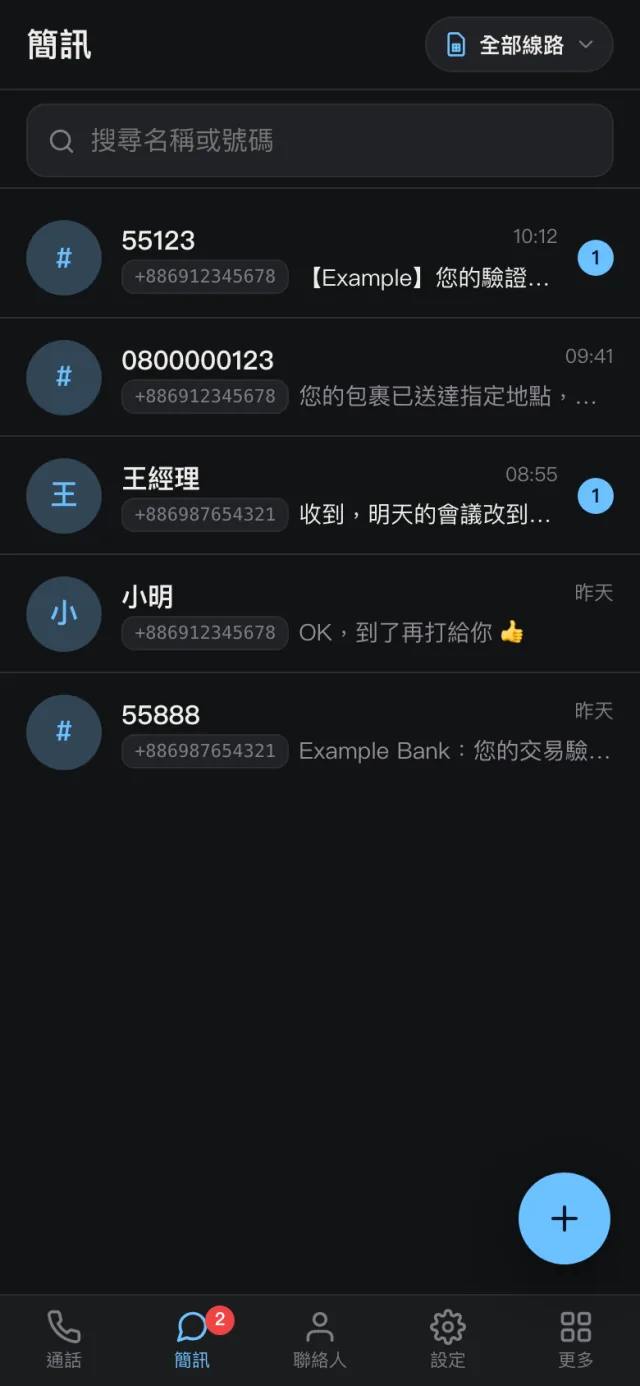
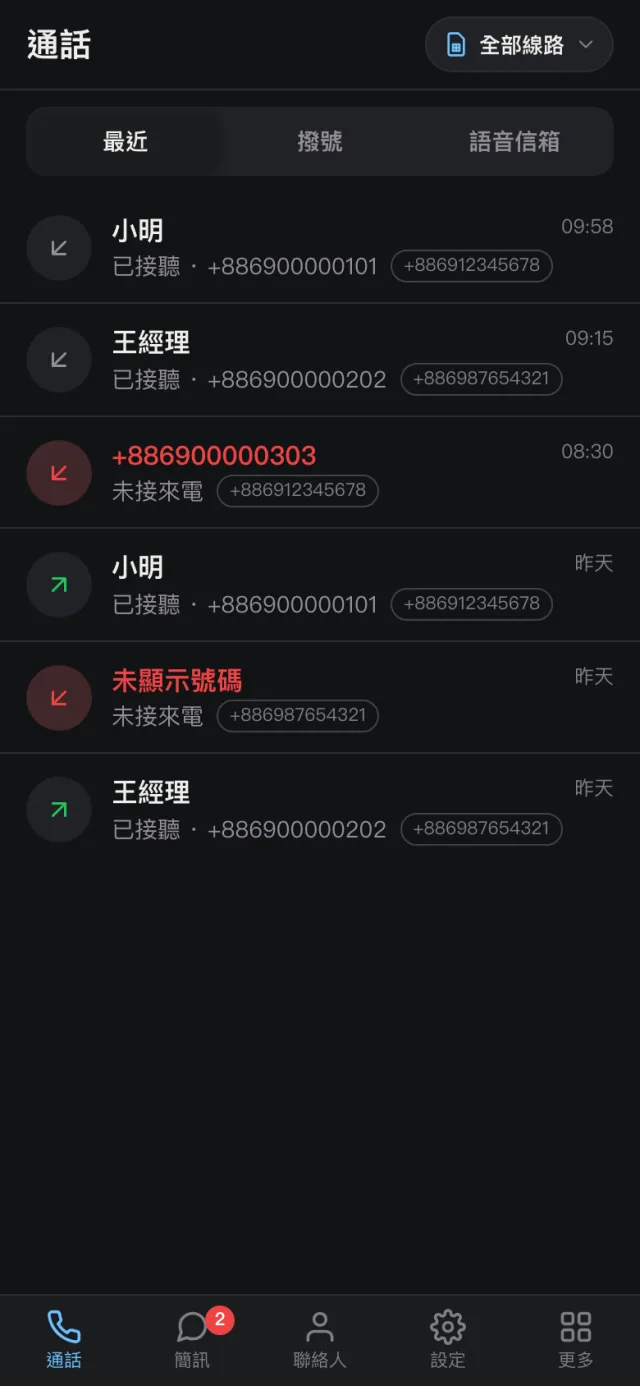
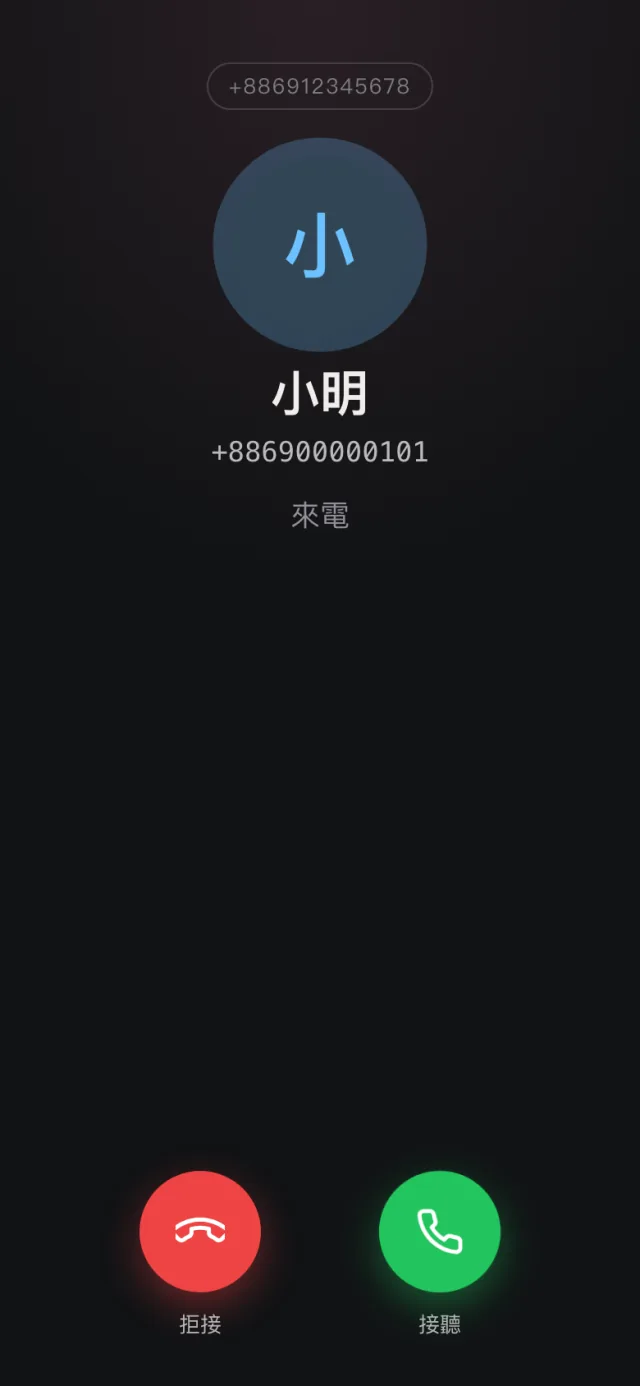
The phone app's interface is in Traditional Chinese.
Change numbers without pulling the card
Put a removable eSIM card (an eUICC) in a USB card reader, and every number on it can be managed from the dashboard or the phone app.
- Download a new number: paste the activation code from your carrier, or paste or drop in a screenshot of its QR code; the app can scan it with the camera, and a confirmation code can be entered when one is needed
- Switch numbers: after you press Enable it shows "Switching…", waits for the card to restart and reads the profile list back before showing the new number, and the new number's line comes online by itself
- Tidy up profiles: rename, disable or delete them, and see the card's EID and free space
- Dual secure elements: on readers with two secure elements (dual SE), both can be managed
Available in the Mac, Windows and Linux builds.

Carriers and platforms
Works with most carriers that offer Wi-Fi Calling (VoWiFi) — many more work than have been tested so far.
Carriers
In daily use, for example:
Settings for UK carriers such as EE and O2 are built in too. All it takes is a carrier that offers Wi-Fi Calling and allows this kind of connection; individual SIMs and plans can differ.
Platforms
The gateway runs on an always-on computer; phones and browsers do the answering:
Where the SIM goes:
On Linux the SIM can also sit in a 4G module such as a Quectel EC25, driven by ModemManager: it gets Wi-Fi Calling the same way, plus texts straight over the cellular network. Mac and Windows use a standard USB card reader; on a Mac it runs as an ordinary program — no Docker, no virtual machine.
Your number lives on your own computer
Keys never leave the SIM
The carrier's authentication happens inside the card; Cevix never reads or stores the SIM's keys.
Data stays local
Texts, call history and settings are kept on your own gateway, with no cloud account to sign up for.
End-to-end encrypted
Reaching your gateway from outside with Cevix Link is end-to-end encrypted.
Signed updates
Every package carries the maintainer's signature, and a tampered update is refused.
Frequently asked questions
What do I need?
A SIM with Wi-Fi Calling enabled (physical or eSIM), a USB card reader, and a Mac, Windows or Linux computer that can stay on. On Linux you can skip the reader and put the SIM in a 4G module instead.
Can I use a 4G module?
Yes, on the Linux build. Modules such as the Quectel EC20, EC25 and EG25 are driven by ModemManager; the SIM inside gets Wi-Fi Calling just as it would in a card reader, and can also send and receive texts over the 4G network. 4G and Wi-Fi Calling can be switched on and off separately for each module. The Mac and Windows builds support USB card readers only.
Does my carrier work?
Most likely, if it offers Wi-Fi Calling: most carriers that do will work — many just haven't been tested yet. FarEasTone and Taiwan Mobile are in daily use, and settings for EE, O2 and other UK carriers are built in. The carrier needs to allow this kind of connection, and individual SIMs and plans can differ.
With the SIM in the gateway, can my phone still use the number?
While the card is in the gateway, the gateway receives calls and texts and pushes them to your phone app; the phone itself doesn't need the card.
Do I need a static IP or open ports?
No. With Cevix Link you can reach your own gateway securely from anywhere, with nothing to set up on your router.
Can I use it to send bulk texts?
No. Cevix is a tool for your own number, not a bulk-messaging or SMS-receiving service; follow your carrier's terms and local law.
How do I get Cevix?
Cevix is not publicly available for download at the moment.

Your SIM stays home. Your calls come with you.
Cevix lets one SIM take calls and texts anywhere there's an internet connection.